
.svg)

Truth is out: potential customers don't want to meet your sales reps🥺
It's time for you to modify your business model—and change the way you currently look at the selling lens to improve the purchasing process.

How Software Buying Has Changed Today
With the digital transformations that came in after the pandemic, the entire picture of B2B software companies and the selling processes has shifted.
Today, prospects want to interact with software vendors the least, or want to interact with them only after they fully trust their decision after evaluating the list of vendors.
According to a survey by Gartner, 18% of B2B buyers research the technology solution independently offline and 27% of them research for it independently online. You see the difference in the numbers here?

Prospects want to be sure that the solutions they shortlist are relevant to them. Only then do they want to go out and evaluate the existing business software available in the market.
And that's why, this B2B buyer wants you to:
- Educate them through different content formats
- Provide them with winning customer support
- Showcase social proof for your solution by emphasizing the customer reviews
To make the purchasing process for the buyer seamless, you need to shift your business processes and your mindset. You need to approach selling business software in the way a millennial wants to be sold to—by providing enormous free information.
What a Buyer’s Journey Looks Like in 2026
Adam, the VP of marketing of a B2B company that sells social media marketing software wants to start creating product demos for their customers to sell their software better. Here’s what happens next:
- The company’s marketing team comes to Adam with a LinkedIn post they saw on Storylane’s LinkedIn page. It talks about how software companies can create interactive product demos in a sandbox environment without coding.
- After seeing the LinkedIn post, Adam gets curious to find out more about Storylane’s platform so he visits their website.
- On visiting the website, he clicks on the ‘Take a tour’ CTA, which directs him to Storylane’s guided product tour.
- Once Adam clicks on the guided product tour, he can see how Storylane works—he can understand everything from how to use Storylane’s Chrome extension to record the product demo, take screenshots or do HTML captures, edit and personalize the screens, and so on.
- To see how similar buyers have leveraged Storylane, he checks out customer reviews and case studies.
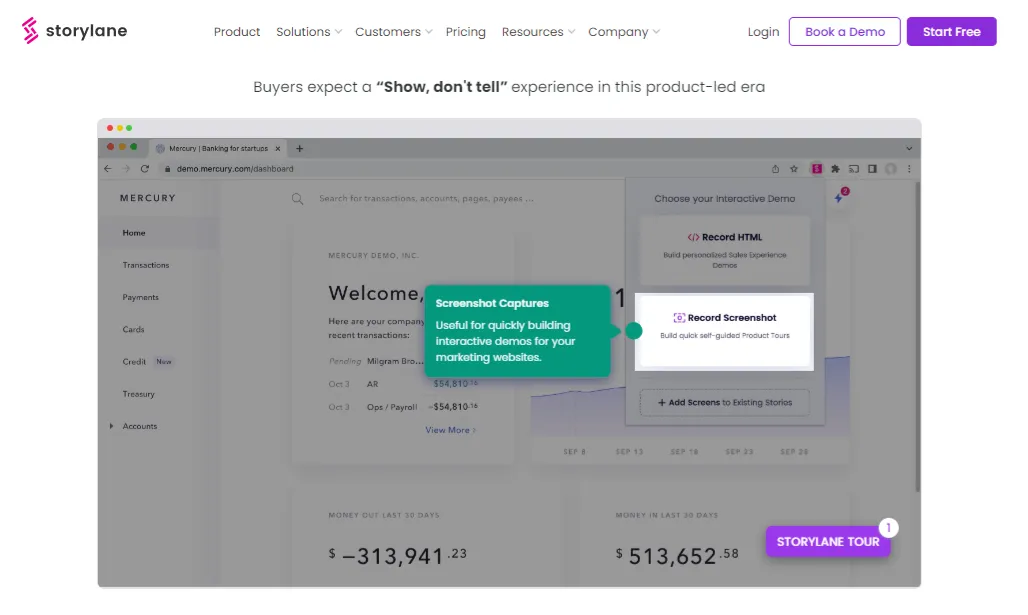
Adam now knows what the process of using the software would look like once he purchases the software from Storylane and starts creating product demos.
Yay, no more hassle of booking a demo with the sales reps without knowing much about the software product.
Here’s the thing: decision-makers like Adam are busy folks.
They can’t spend an enormous amount of time getting a live product demo for multiple tools and then deciding which tool is the right fit for them.
And that’s why Adam liked how Storylane made his work easier by letting him see how the platform works.
Now, if he thinks this is the right software his team could use, he’ll book a demo with Storylane’s team and get onboarded.
Phew! That’s quick decision-making, isn’t it?
That’s how an ideal 2026 buyer purchases software from companies. The buyer won't come knocking on your sales team's door enquiring about your technology solution. Nope.
Instead, they’ll find zillion ways to get to know your product. They will:
- Compare your software with 10 other potential vendors available in the market
- Play around with the tool
- Check how your tool works, how resourceful and quick your customer support is
All in all, they will evaluate your software in terms of:
- Deals
- Product's interface and how it works
- Security and compliance
- Business operations
- Error-proof operation
- Friendly customer support
After analyzing the software's overall performance criteria, they will decide whether your software is the right fit for them or not.
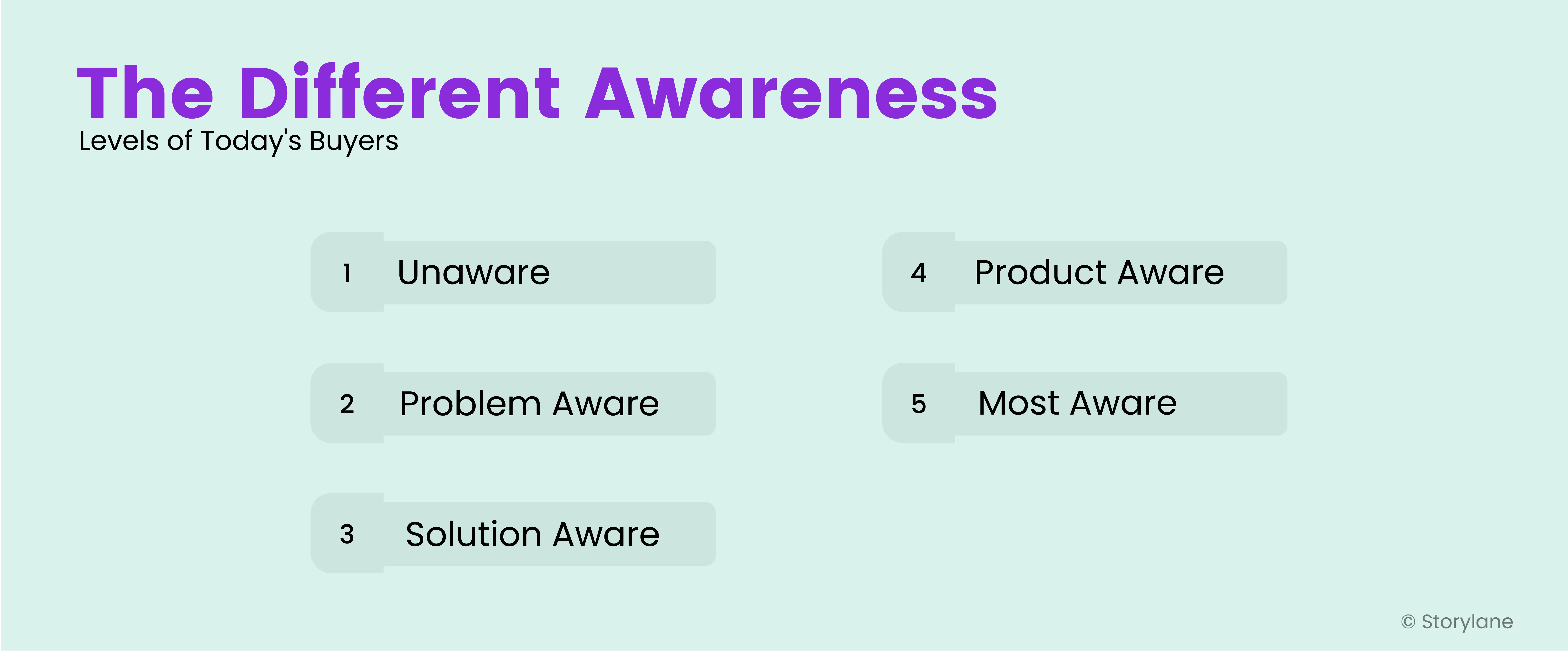
Harsh truth: not every buyer that comes your way will be educated like Adam who knows his pain points and the solution he needs. This brings us to the different awareness levels of today’s buyers
Also Read: The B2B Buying Process in 2026: A Complete Overview
Challenges Buyers Face While Purchasing Software Today
The B2B buyer’s journey is dense. And for you, this means that you’ve to present yourself as the potential solution. What do these challenges look like? Let’s find out.
Challenge #1 — Too Many Choices
Since the rise of technology during the pandemic, numerous software solutions are released almost every day. Overwhelmed with options, this poses a great challenge to buyers.
“From sales and marketing, the challenge for the buyer is to find out himself among plenty of available proposals that he is receiving from many IT companies around the world. These companies even don't know that he is looking for anything to buy as the number of marketing campaigns (cold mailing, cold calls) increase significantly this year. So no matter if it is the custom software purchase process or looking for any ready-to-use SaaS product, the buyer has plenty of companies that are starving for a new Client, but which will be the best for him?”
— Mateusz Sadowski, CEO and Head of Sales and Marketing at Mobile Reality
For example, a prospective buyer looking for a project management solution can explore software options like Trello, ClickUp, Notion, and Todoist.
Question: which of these four solutions will fit their customer requirements?
Suppose they decide to look into Trello. But they don’t just want a board-style tracking system and so Trello won’t be the right solution for them as it offers tracking only in the board and card format.
Now, they’ll move to Notion.
The tool is incredible. They see several integrations Notion provides but there’s an important integration the tool is missing out on—integration with Google Calendar where they can directly get notified about their deadlines from Google Calendar. But Notion only lets them view the timelines inside Notion and not elsewhere.
Henceforth, the buyer has to look for another solution.
You see? Even when the buyer understands their needs, this process is complicated. The problem is, they cannot determine which product out of the list of products fits their needs.
“We find the biggest hurdle for buyers to face when purchasing software is choosing a product that meets the customer requirements. There is so much competition in the software marketplace with a lot of products offering similar thing. You have to put in the effort to educate buyers on why your SaaS is better than others and be transparent enough that the customer can evaluate all available options before making an informed purchasing choice.”
— Alister Wood, Business Owner at Visit Us
Challenge #2 — Lack of Trust and Transparency
Here’s the thing - today’s buyer doesn’t like asking the sales team and you about software pricing options. Instead, they want to take charge and see it right in front of them.
With open pricing in place, the buyer can understand what the software company offers and whether they can trust the claims the software makes.
“There can be a lack of transparency or clarity around the product's features, real-time pricing, and licensing model. This can lead to confusion or frustration for potential buyers, particularly if they are comparing multiple options or trying to understand how a particular product will meet their specific needs.”
— Robin Salvador, Marketing Consultant at KodeCloud
Challenge #3 — Involvement of Multiple Decision-Makers
“As a B2B SaaS business offering a corporate email signature management software solution, the business challenge that we see buyers facing is the involvement of multiple decision-makers (often from different departments, such as Marketing and IT) in the purchasing process. This is then compounded if the ultimate decision to purchase lies with Finance.”
— Wade Willingale, Sales Director at Rocketseed
True—when multiple decision-makers are involved in the process, it only complicates the buying process for potential buyers.
Today, even for a low-ticket SEO tool to be purchased, the approval has to come from the various staekholders within the marketing team, the leadership, and then from finance.
If this is the approval process for a low-value solution, imagine the approval process for a high-value enterprise solution!
It can be a pretty exhaustive buying cycle. Here’s what you can do in such cases: Make a strong internal proposal to purchase the solution.
You can do this by:
- Sharing educational content about the challenges they are facing and about the product from the technology partners with the stakeholders to make decision-making easier.
- Create a personalized microsite for internal stakeholders where you highlight the challenge you’re facing in scaling up your key responsibilities, the relevant solution (the software for purchase), cost overview, case studies, timeline you want the software for and how it will benefit the company.
When the internal stakeholders get a clear visualization of the problem, the costs and the solution—they can make the decision to purchase the solution quickly.
Also Read: Making a Strong Internal Case to Purchase New Tech
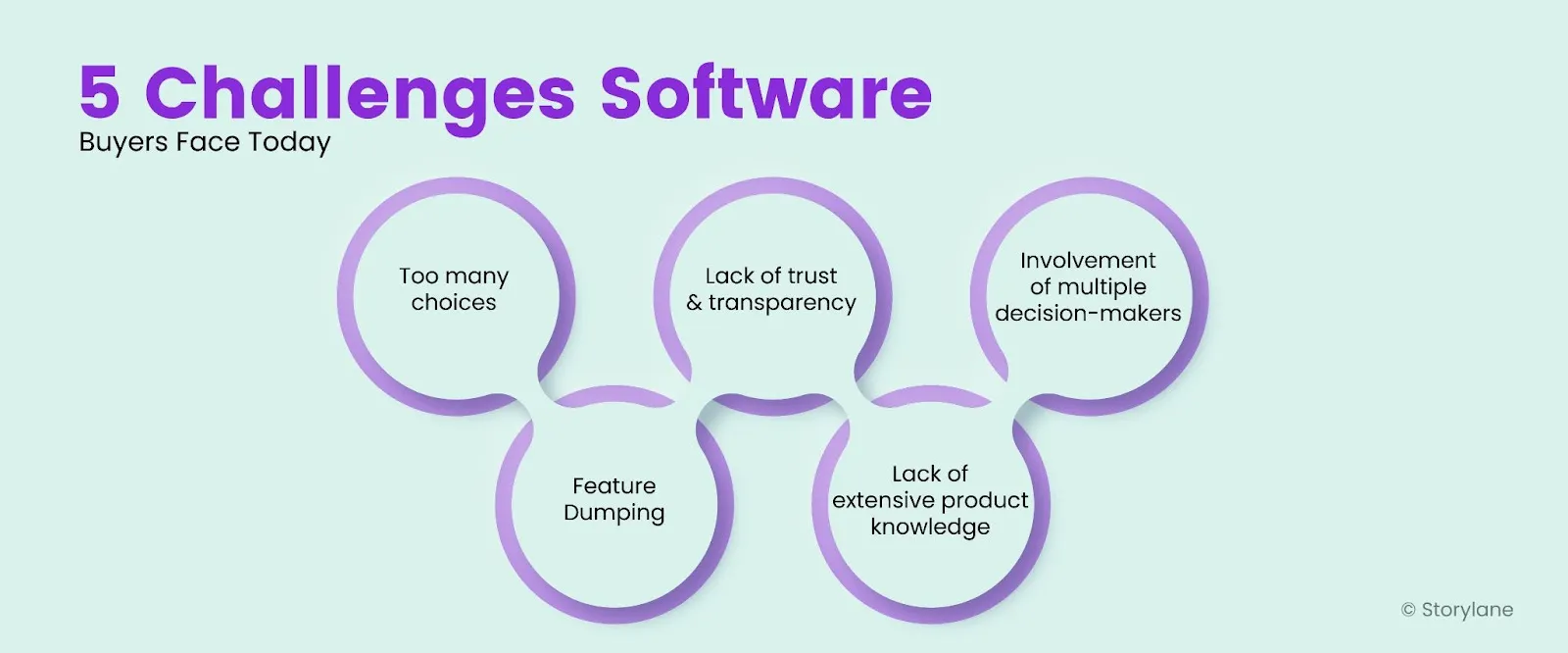
Challenge #4 — Feature Dumping
Software companies overestimate the potential buyer and share product features and other information using high-end technical jargon - without much context as to how they’ll help the buyer.
The result?
The potential buyer fails to understand those features and eventually stops using the software.
“One of the biggest challenges is navigating through complex technical jargon and understanding how it applies to their specific business needs. This can often lead to confusion and frustration for buyers who feel overwhelmed with information they don't fully comprehend.”
— Vaibhav Kakkar, CEO of Digital Web Solutions
One easy way to avoid feature dumping and provide context for critical features is to hand the buyer a guided interactive product tour. This gives them complete control and lets them choose what product feature they want to learn about, without getting overwhelmed and on their own time.
Challenge #5 — Lack of Product Education
Unless you actively educate your prospects about your product right from the discovery process, they cannot fully comprehend the ways in which your product can solve their pain points.
“Many businesses look for software programs, but B2B companies struggle to close deals because prospects lack product knowledge. Sales teams must prioritize awareness nurturing to earn the confidence of B2B prospects.”
— Simon Bacher, CEO and Cofounder of LingApp
To ensure your potential buyer sees your product’s value, purchases it, and continues using it, product education across all buyer stages (pre-sale, during sale, and post-sale) is critical.
How You Can Create a Superior Software Buying Experience for Prospects
Now that you’ve understood the hardships the buyer faces during the business software buying process, let’s look at ways to remove the friction and make the buying process seamless.
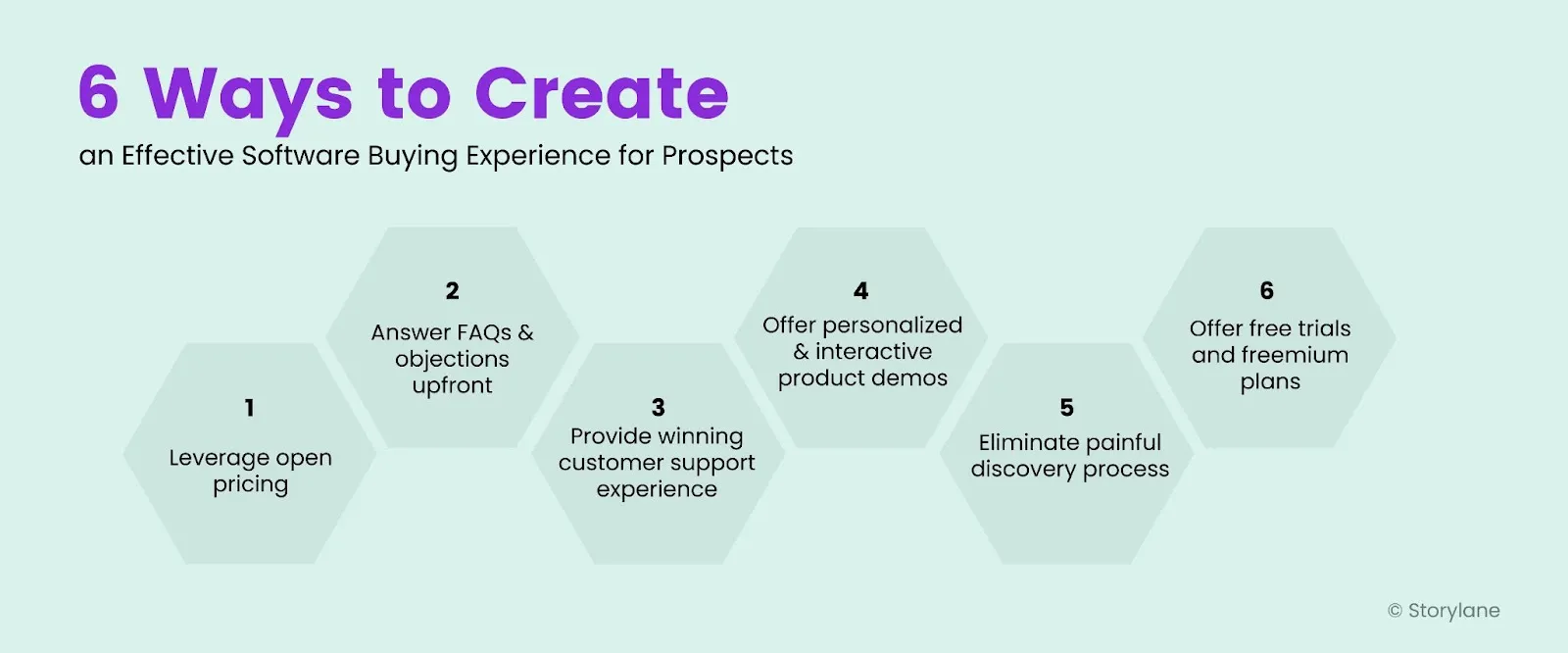
Leverage Open Pricing
Buyers don’t want to email you or chat with you initially when they visit your website. They don't always like to request for proposal, especially at the initial stage when they have *just* landed on your website.
What they want from you are upfront pricing plans. This gives them complete control in deciding whether your product is within their budget or should they evaluate another software.
And no, sharing just the costs for different plans doesn’t come under transparency. They want a comprehensive breakdown of each plan—what is included and excluded and how one plan is better than the other? They want to know all of it.
So, create detailed product pages and showcase the different real-time pricing plans along with the detailed breakdown on your website.
Here’s how Storylane displays its different pricing plans on the website. It describes everything the buyer will get when choosing a particular plan.

Robin Salvador further emphasizes the importance of comprehensive pricing plans.
“Provide clear and detailed product information, particularly around pricing and features. For example, you could create a user-friendly real-time pricing page that clearly outlines different pricing tiers and what is included in each one, or provide a detailed product comparison chart that shows how your product stacks up against competitors.”
Answering FAQs and Objections Upfront
When a prospective software buyer explores the potential suppliers and their software, a few questions will pop up in their minds. So how would you tackle these questions? There are two ways:
Display the FAQs on Your Pricing Page
Convertkit displays a frequently asked questions block right inside the pricing page after displaying the real-time pricing tiers.

They have chosen the most frequently asked questions and added them here. Also, they have made these questions reader-friendly by adding a toggle option to these questions. Instead of showcasing the answer along with each question, they showcase the questions.
Out of these, the question that resonates with the prospect the most, they’ll click on that specific question and find the answer.
💡Pro tip: While adding FAQs, limit the number of questions you put in the FAQ section—a maximum of 7-8 questions.
Create a Knowledge Base and Answer Questions about the Product
The knowledge base is a great way to educate prospects about the features of your product. Storylane adds a knowledge base in the resources header on its website with the name ‘Help Docs’ for its audience to easily navigate through the page.

Here, every major aspect of the product that the prospect would want to know like creating the demo, showcasing the demo, and so on is addressed.
💡Pro tip: Add interactive demos within your knowledge base—this works well for prospects who fail to understand the steps with just textual steps—they can see the visuals and navigate through the platform.
Provide Winning Customer Support Experience
Not always do FAQs and knowledge bases work in your favor and that’s when you need an instant communication approach for your buyers. Integrate live chat software on your website that helps customer support directly talk to the prospect and answer their objections upfront.
Take a peek at how a freemium user stepped up and asked the query to Convertkit’s support team using their live chat feature.

The customer support team responded to the user’s query within 30 minutes and helped the user with the resolution—making their experience with Convertkit smoother.
💡Pro tip: To create a similar experience like Convertkit, use live chat software like Zendesk and Gorgias.
Offer Personalized and Interactive Demos
Imagine a potential buyer visits your website, explores the product pages to understand the features, and checks out your customer success stories.
All they need now is to get an actual look and feel of the product.
Sure, you can offer them a free trial. But what if they don’t know how to navigate the product after signing up for the free trial?
Not always are prospects interested in spending 2-5 minutes watching the demo video on your website.
That’s where you need an additional layer of guided, interactive product demos.
"We at Falconics have implemented a strategy of offering self-guided, interactive product demos. Our strategy recognizes that potential buyers want to explore software solutions at their own pace and without feeling pressured by sales representatives. To accommodate this, we work with our clients to develop interactive demos that showcase their software's key features and benefits, complete with explainer videos and real-time simulations. These demos are easily accessible from our clients' websites, requiring only basic contact information to unlock the full experience.
Since implementing this strategy for our clients, they have:
- Seen a significant increase in demo requests and overall engagement with their products
- Experienced shorter sales cycles and higher conversion rates
This is because potential clients have a clearer understanding of their software's capabilities and value proposition before engaging with their sales teams. As a result, their sales teams can focus on addressing specific concerns and tailoring custom software solution to individual clients' needs, resulting in a more efficient and streamlined sales process."
— Brandon Falcon, Owner and CEO of Falconics
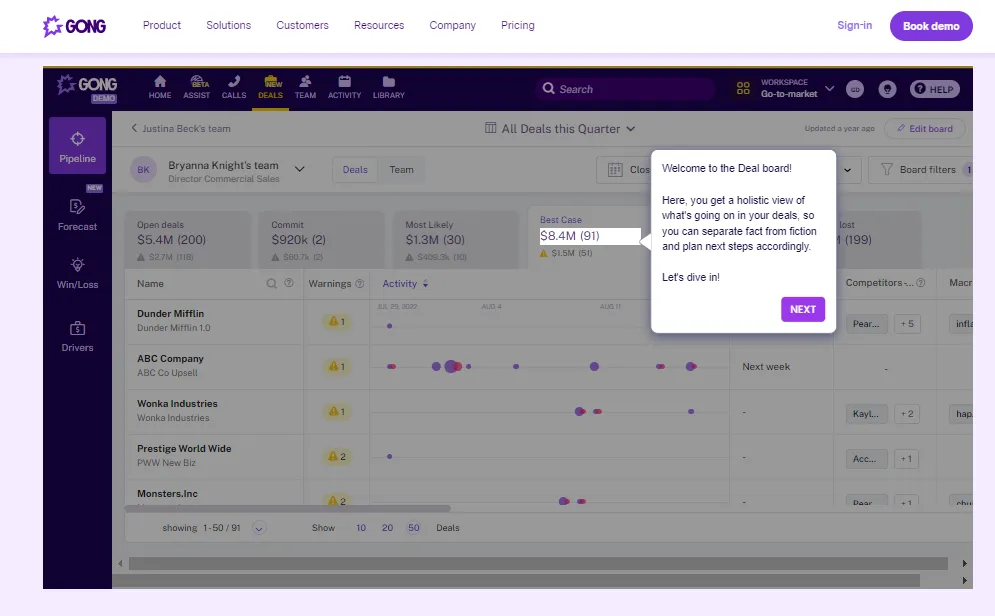
Check out Gong’s interactive product tour created with Storylane to show its first-time users how to explore the product.
Eliminating Painful Discovery Process
The most frustrating part for a buyer who is finalizing their decision is the broken sales motion.
Adithya Kothadiya, the Founder of Avoma faced a painful sales process when he wanted to get onboard with a renowned sales intelligence solution.

The vendor asked him numerous questions, which are usually part of sales reps' research and emailed those questions to Adithya.
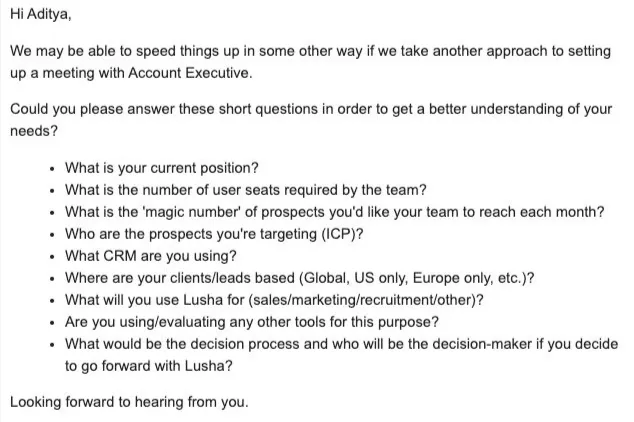
But the good news is, this situation can be improved. How? By optimizing your current sales process.
A few ways to get to know your potential buyer better and ask smart questions include:
- Finding a sweet spot when asking questions—whether over email or on call
- Asking questions that lead to the next steps
- Building a feedback loop—interviews, surveys, polls, and satisfaction scores to curate questions to ask the potential buyer
- Using technographic data to know details about the prospective buyer, and craft intelligent and open-ended questions
Also Read: B2B SaaS Sales: The Complete Guide to Meet Your 2026 Quota
Offer Free Trials and Freemium Plans
Buyers want a risk-free way to try your product before they decide to take out their credit cards. This has to go beyond sharing tutorials and educational content with them.
It involves giving them a real-time experience of your products by offering free trials and freemium plans.
“At Testlify, we provide a free trial of our platform to buyers. This allows them to test out our software and experience its benefits firsthand before purchasing. As a result of this strategy, we have seen a significant increase in customer acquisition and retention. Our free trial has helped convert hesitant prospects into paying customers.”
— Abhishek Shah, Founder of Testlify
- Free Trial: You give a taste of all the features of your product to the potential buyer for a limited period say a 14-days free trial (Trials can range between 7-days free trial,14-days free trial, or 30-days free trial)
- Freemium Plan: You offer a free forever plan where the potential buyer can use limited features for a lifetime
While both approaches are effective, what is right for your company depends on the buyer’s needs.
However, companies offering free trials have one flaw.
“Most companies provide free trial periods to allow potential customers to test the software. This is a great way to gather information about a product’s strengths and weaknesses and make a more informed decision on whether it will work for you. The problem is that while most trials are longer than a week or two, they are usually limited in some way. This can create a problem for buyers who want to take their time to learn the software inside and out.
Matthew supports his POV with an example.
For example, a potential customer may want to test enterprise software for a month before purchasing. However, most trials are limited to 30 or 60 days. These time constraints can make it difficult to get a true sense of the software’s capabilities. In the end, this can lead to frustration and some customers deciding not to buy. Providing longer free trials with no time limits can alleviate these kinds of problems and make the enterprise software buying process more enjoyable for buyers.”
— Matthew Ramirez, Founder of Rephrasely
The free trial approach gives you ample time to nurture the prospective buyer through personalized content and customer support. But, what if the prospective buyer doesn’t convert after the trial ends?
Well, it’s your chance to continue nurturing them. Here are a few ways you can do this:
- Send them email sequences along with case studies and tutorials—educating them more about the product (in case they missed out on a specific feature).
- Invite them for an interactive demo call where your sales reps showcase the potential of the product and answer any concerns the prospective buyer has.
- Embed interactive product tours into product announcements emails to give your free trial customers a hands-on experience of your premium features—and reach out to the engaged customers later, for more conversions.
Also Read: Tips To Build an Enterprise Sales Strategy that 2X Your Revenue
Becoming the Chosen Software Solution for Your Prospect
If you want to become the chosen software solution for your prospect and get them to buy your software, you need to:
- Be transparent about your software pricing plans including all upfront costs
- Answer all the frequently asked questions by customers upfront
- Provide a winning customer experience and showcase social proof through online reviews and case studies
- Use interactive product demos on your website and during the sales calls
- Eliminate the long and slow discovery process that takes months to get the customer onboarded
- Offer free trials and freemium plans for the customer to try out your software
You're just a mindset away
If you want to present your software as an all-in-one solution to your prospects and get them to use their credit cards, you need to change your traditional sales mindset and adopt a millennial mindset.
Start by educating potential buyers about the product and offering them automated, interactive demos to influence their buying decisions. Next, evaluate the processes your sales reps use and optimize them from there.
Want to see how to create an interactive product demo for your software with Storylane? Book a demo!
Related Reading
Deciding between renewing existing software versus purchasing a new one