I get asked this a lot - can you embed Storylane explainer bubbles (aka widgets) in my existing product so that a new signup can understand the product as they are onboard?
Storylane is not an onboarding platform—but it aids onboarding
it is for your buyers to understand your product better before they either signup or take a demo with you. While onboarding tools like Pendo, Appcueus, Walkme work on an existing product, Storylane takes a copy of your frontend and then inserts explainer widgets with a story so that your prospect truly understands the benefits of your product. This accelerates the decision making process of the prospect and how the product will fit into your use case.
The biggest challenge all GTM teams face today is to draw the attention of their buyers.
In today’s world buyers are becoming more savvy about their experience and their patience is limited. If there is an excruciating wait to get their hands on the product or for them to populate the right dataset after signup, they go to a competitor that can get them to evaluate faster.
It’s becoming imperative for Marketing and Sales teams to show the full product in full to get buyins from the buyer organization. Sales Engineering teams spend an inordinate amount of time creating custom environments for prospective customers, instead now they have Storylane to get them going.
I have been a user of Pendo and Appcues. Let's compare their utility wrt what Storylane does.
Item
Onboarding tool
Storylane
Comments
User Onboarding (in product)
x
After signup widgets popup to lead the user to the next step towards success
Feature adoption
x
x
Storylane can create product tours of new features
Product tour
x
Entire frontend is hosted on Storylane and a guided product tour takes user to the main benefits of the product
NPS and surveys
x
Customer satisfaction scores
Presales testdrive
x
Sales Engineering teams can give out a link which allows buyer to do a pre POC evaluation of the product
Help Guides
x
With Storylane no login in required
Requires login into the product
x
It can only happen while user is logged in
Typical users
Product team
Sales, Marketing
Storylane can be used by customer support teams also
User onboarding vs product tours - Some Frequently asked questions
Q. Do I need both a product tour tool for pre-sales and an onboarding tool for post-signup, or can one platform handle both?
Yes, most teams need both. Demo platforms like Storylane work on sandbox copies without product access, qualifying leads before signup. Onboarding tools require login and operate in your live product to activate users post-signup. They serve different audiences at different funnel stages—demos qualify inbound leads, onboarding reduces customer churn.
Q. Which should I implement first: interactive demos for pre-sales or onboarding tours for post-signup users?
Start with demos if you have traffic but low trial conversion. Start with onboarding if you get signups but poor activation. Demos offer faster wins: launch in 2-3 hours versus weeks for onboarding, no engineering needed, immediate lead qualification.
Q. Can interactive demos replace traditional sales demos, or do I still need my sales team to do live presentations?
Demos complement sales, not replace them. They handle product education at scale while sales focuses on high-intent accounts. Storylane customers report sales reps spend 40% less time on basic product education and more time closing deals with pre-qualified prospects who already understand core features.
Q. How much faster do PQLs from interactive demos convert compared to traditional MQLs?
Product-qualified leads convert at 25-30% versus ~6% for marketing-qualified leads—roughly 5x higher. Sales cycles compress from 84 days to 30-45 days with product-led approaches. Demo engagement predicts buying intent better than demographic scoring alone.
Q. What happens if my product changes frequently—do I need to update my interactive demos constantly?
No. Update only key workflows when major changes occur. Storylane's Chrome extension recaptures updated screens in under 5 minutes without rebuilding from scratch. Focus demos on stable core workflows solving your biggest pain points, not experimental features that change constantly.
Q. Our product is enterprise-grade and complex—can interactive demos really show enough to qualify leads?
Yes. Focus on one core workflow solving your biggest pain point, not the entire product. Storylane analytics show prospects engaging 4+ minutes convert at 3x the rate of early drop-offs, making engagement time a reliable qualification signal for complex enterprise sales.
Q. What's the difference between a product tour, product walkthrough, and interactive demo?
Product walkthrough: in-product, requires login, guides existing users (Pendo, Appcues). Product tour: ambiguous term for both walkthroughs and pre-sales demos. Interactive demo: pre-sales tool in sandbox environment, no login needed—Storylane uses HTML captures or video that prospects explore before becoming customers.
Here's an example of a Storylane interactive demo: 👇
Q. Can I embed interactive demos directly in my website, or do prospects have to click away to a separate page?
Both. Most platforms offer embedded iframes for product pages and standalone URLs for email campaigns. Embedded demos keep visitors on-site and increase engagement. Standalone links work better for sales outreach—easily shareable and trackable.
Copy link
“In a world older and more complete than ours they move finished and complete, gifted with extensions of the senses we have lost or never attained, living by voices we shall never hear.”
Choosing between Consensus and Storylane? You're in the right place.
We tested both demo automation products, interviewed past users, and dug through 200+ customer reviews to uncover the actual user experience. Before you settle on a demo automation tool, let's break down what you're actually buying and which one fits your team.
We'll focus on how both demo automation platforms compare in terms of ease of building demos, demo sharing capabilities, pricing, and scalability. This comparison comes from Storylane, so yes, we're biased. But every claim here is backed by product testing, customer interviews, and verified G2 reviews. We'll show you where Consensus genuinely excels, then explain where we believe Storylane does better.
What we evaluated (and both platforms offer)
We judged both platforms on the workflows that actually impact your team:
Demo creation: How fast can you build demos? What's the learning curve?
Demo sharing: How easy is it to personalize and distribute demos to prospects?
Prospect experience: Can buyers navigate demos without you? What friction exists?
Maintenance: How do you keep demos current when your product changes?
Getting started: Can you test before buying? How long until your team is productive?
Platform architecture: Are you managing one system or two?
On paper, Consensus and Storylane overlap significantly.
Both platforms check basic boxes. The real differences lie in how these features actually work irl.
Let's be honest about what Consensus does well
Consensus pioneered this category in 2013. They've been doing video demo automation longer than most alternatives have existed. Credit where it's due.
Their branching video demos are legitimately good. Works well when deals require sophisticated flows that adapt based on buyer interests
Comprehensive RBAC. Eight-plus standard roles, custom roles, and granular permissions. Managing complex enterprise org structures.
Demolytics helps you show leadership what's working and help get internal buy-in
ReachSuite acquisition (September 2024). They added interactive demos, which launched early 2025. This shows they recognized where the market was heading.
Now, let's break down how both platforms handle the core demo automation workflow stages.
1. Demo creation: Zero to demo faster
You need demos ready fast. Sales has calls tomorrow. Marketing needs them for next week's campaign. Here, we will explore how quickly you can go from idea to demo with both platforms.
Ease of use and speed
Storylane gets you productive in minutes
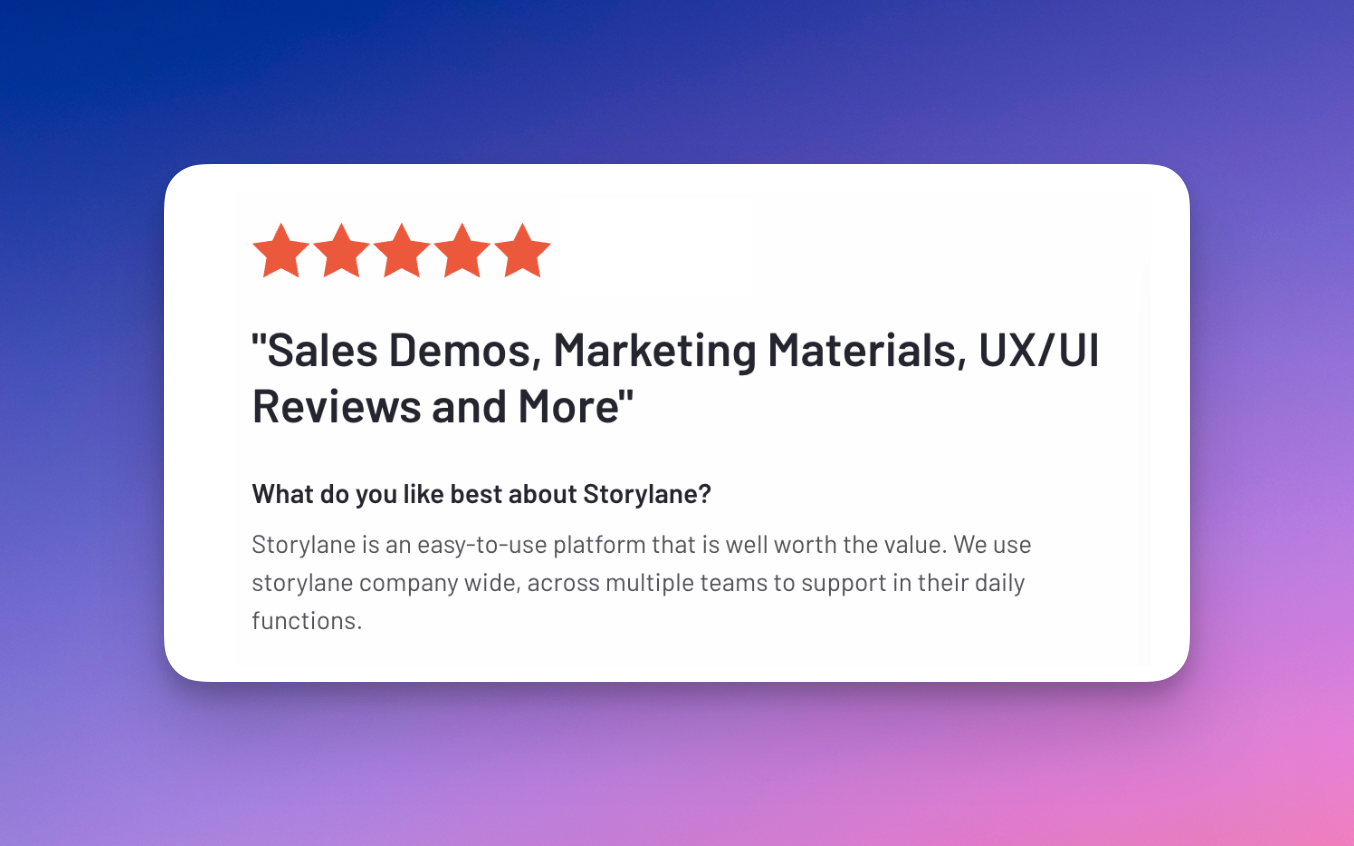
Storylane has the highest CSAT score in demo automation (99/100) across 1,129 reviews, ranking #1 with 9.5/10 for ease of use and setup.
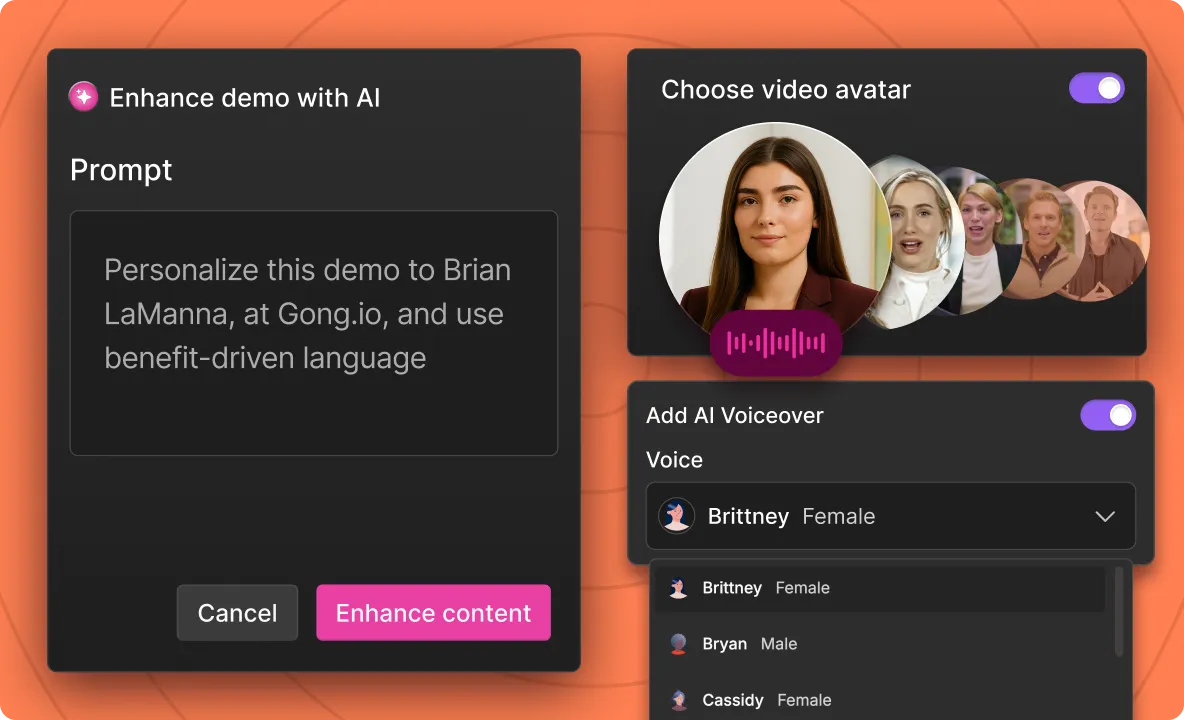
AI-native since July 2023 – AI generates demo script, guides, tooltips, and voiceovers automatically—you can actually create (killer) demos in 2 minutes.
Intuitive, no-code experience: Anyone on your GTM team can start building demos without training sessions.
Minutes to first demo –genuinely fast creation without technical skills
We proved this scale when I personally built 7,000 demos for our demo-led SEO growth experiment—only possible when a platform is genuinely easy to use. This strategy went viral enough to get featured on an episode of Exit5
This level of speed and scale wouldn't be possible with Consensus.
Consensus requires an investment in learning
Their G2 reviews consistently mention a steeper learning curve:
Users appreciate the power once mastered, but the time to productivity is longer
AI features launched October 2025 – newer to AI-powered workflows (18 months behind Storylane)
Verdict: Storylane wins on speed to value. If your team needs demos this week without training overhead, we deliver.
Turning videos into interactive demos
This is a nifty feature where you can upload existing product videos and add interactive layers—pause points with hotspots and annotations.
Even though the tour quality isn’t great (limitations due to the video source). It’s still a handy feature as it's helpful to enhance your existing demo libraries. This matters when you've already invested in video libraries and don't want to rebuild from scratch.
Storylane does this, and as of December 2025, Consensus does too—both platforms handle it well.
Maintaining and updating demos
This is where Consensus has a clear advantage: auto-update functionality.
When your product UI changes, Consensus can automatically refresh demos through bot-replay technology. It replays your original click sequence to recapture updated screens—a genuinely neat feature that saves significant maintenance time.
There are some caveats:
It breaks if your product structure changes,
Requires live product access (SEs only), and
You can't touch your mouse during the process.
But it's still a strong capability.
Verdict: Consensus wins here. If your product structure stays stable and SEs manage demos, their auto-update saves real time.
Storylane doesn't have auto-update (as of now), but you can easily swap out screens that need updating—less automated but controlled.
2. Demo sharing: getting demos to prospects
Here, we'll explore how both platforms handle personalization, link management, and getting demos into prospects' hands.
Personalization at scale
Both Storylane and Consensus offer AI-powered personalization now. You can customize demos with prompts, change text, swap images, and adjust data points for different industries using AI HTML editors.
Storylane: 18+ months of AI maturity
Refining AI features since July 2023—18+ months of production refinement
Battle-tested across thousands of customer demos before Consensus even had interactive demos (launched early 2025)
Handles complex personalization scenarios reliably because we've been perfecting it longer
Consensus: Newer AI capabilities
Consensus launched their AI features in October 2025. The capabilities are functional, but they're still working through the learning curve we completed over a year ago.
The duplication bottleneck
Both platforms handle personalization through URL parameters—useful for swapping names, logos, and basic data variables.
But Consensus doesn't let you duplicate DemoBoards (their equivalent to Buyer Hub)
One G2 reviewer captured this pain point: "I think it'd be super helpful if I could just duplicate demo boards instead of having to create a new demo board over and over again every time I want to send it to a new client."
If you need to create variations with different messaging, content flows, or structural changes—you're rebuilding from scratch
Result: 5 personalized Demoboard versions = hours of repetitive setup
Storylane doesn't have this bottleneck: Duplicate any Buyer Hub → customize what needs to change → done.
Verdict: Both platforms handle AI personalization. Storylane's advantage is AI maturity (18+ months) and faster duplication for personalisation.
Link stability when you update demos
You publish a demo, embed it on your website, add it to sales decks, and include it in email sequences. Then your product changes. Now what?
Storylane maintains the same link upon Republish. Update your demo, hit republish, and every place you shared that link automatically shows the updated version. No broken links, no hunting down everywhere you embedded it.
Consensus doesn't offer this. When you update a demo, you're managing new links across all your touchpoints.
Export flexibility
Storylane lets you export demos as videos and GIFs. This matters for email campaigns where interactive HTML doesn't work, or for sharing on social platforms.
Consensus doesn't support export to video or GIF format.
Verdict: Storylane wins if you need demos in multiple formats beyond interactive embeds.
3. Buyer experience: How is the buyer experience with the demos?
You've built a demo and sent it to prospects. But how is their actual experience interacting with it?
Demo experience
When you hit video sections in a Consensus demo, you can't skip ahead—even if the content isn't relevant to that viewer's role or use case.
This matters for champion enablement. When your internal champion presents your demo to their buying committee, they can't fast-forward through video segments that don't apply to specific stakeholders. They're stuck waiting through content that might not be relevant.
Storylane Demos handles transitions smoothly and lets viewers control the experience. Use the progress bar to skip any section or navigate directly to what matters for their role.
AI sales agent for instant buyer enablement
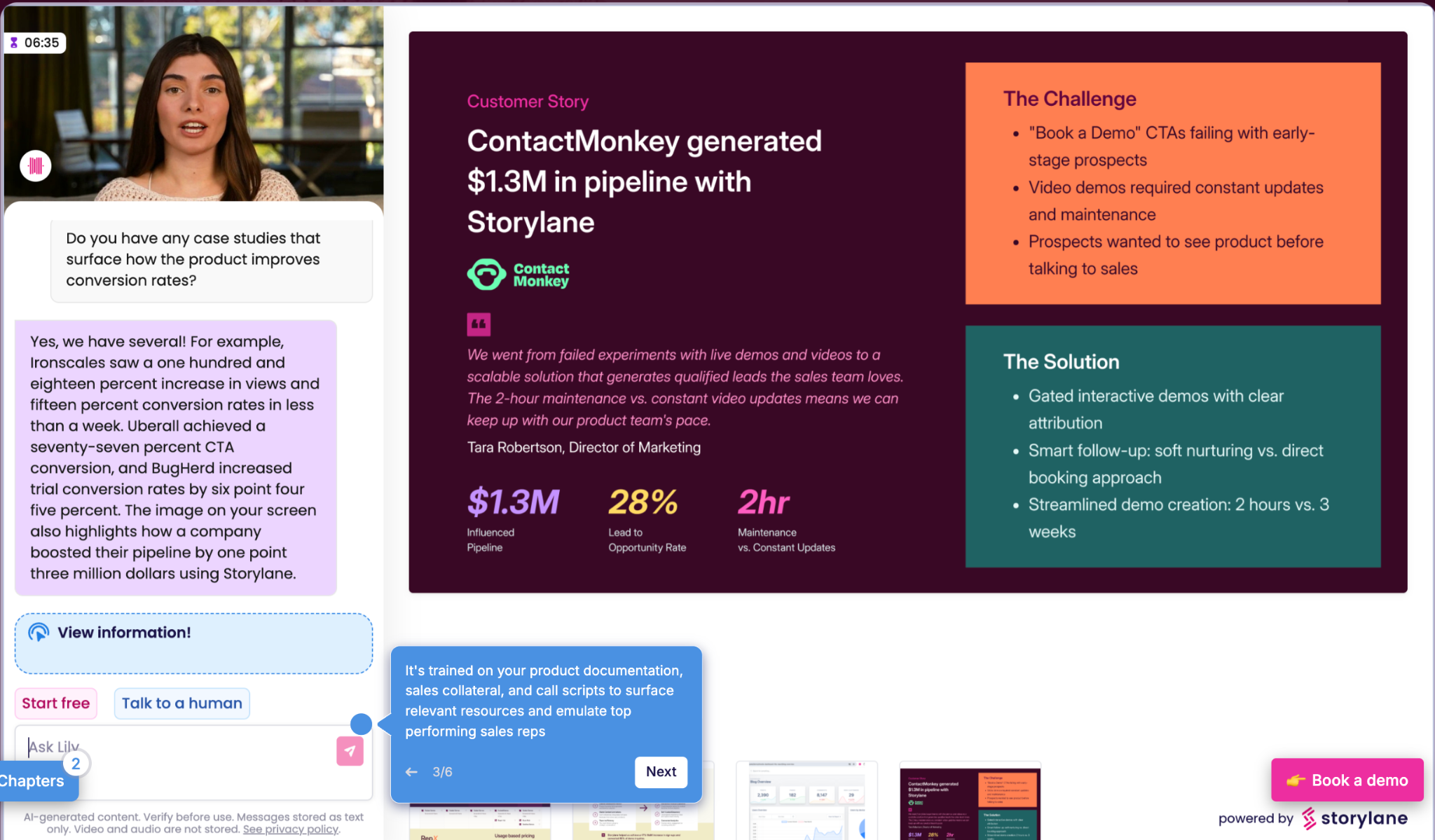
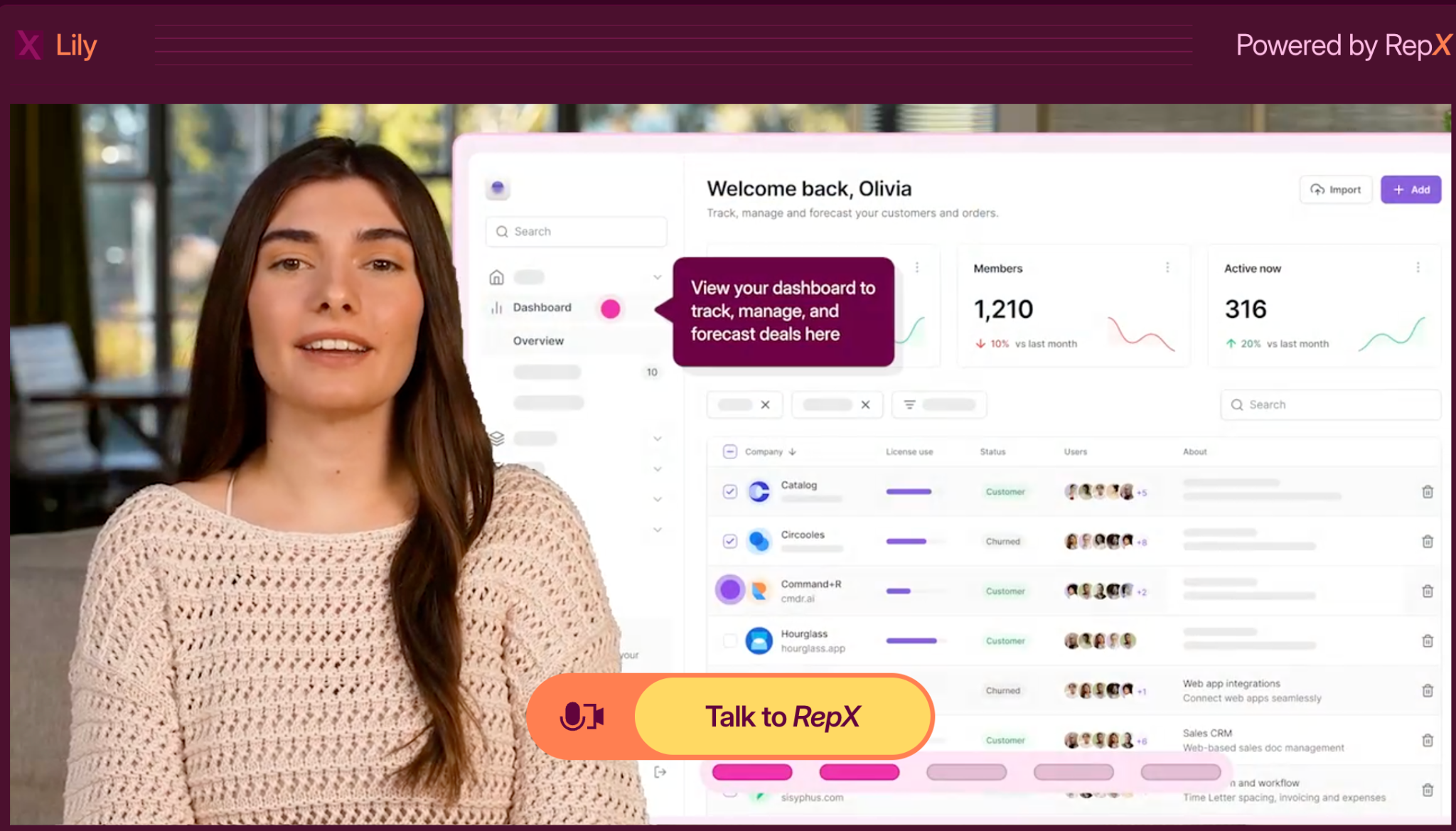
Storylane launched Lily AI, an AI-sales agent, in March 2025. She handles product conversations with your inbound prospects like your best sales rep. Buyers can ask questions, navigate objections, and get instant answers—all without waiting for your team.
Provides self-guided discovery for buyers exploring your product
Automatically qualifies prospects based on fit and engagement
Recommends the right demo for specific use cases and personas
Trained on your team's best playbooks, scripts, and documentation
Consensus doesn't offer an AI sales agent feature as of now. Though it’s been marked coming soon on their website for a while.
4. Analytics: understanding what's working
You need to know which demos are driving the pipeline and which are falling flat. Can you get those insights easily, or are you digging through complex dashboards?
Consensus demolytics is comprehensive
Consensus offers comprehensive analytics with granular engagement tracking. Demolytics is praised in G2 reviews for demonstrating ROI to leadership. The depth is valuable for executive reporting—the tradeoff is complexity when you need quick insights.
Storylane keeps it simple
Straightforward interface focused on actionable metrics: views, drop-offs, engagement, and Account Reveal (Deanonymize demo visitors). Get answers fast without navigating layers of dashboards.
Verdict: Consensus for depth and stakeholder reporting. Storylane for simplicity and deanonymisation.
One note though: Despite all this granular permission management, neither platform offers bulk team management.
5. Time to value: how fast can you actually start making demos?
Your team needs demos now. How long until you're actually creating them?
Consensus: Sales cycle, then learning curve
Consensus doesn’t allow you to just sign up and start. You need to go through their enterprise sales process to get access. That means discovery calls→ demos→ negotiations→ onboarding.
Once you get the product, your team still needs training to tackle the initial learning curve most consensus users face.
G2 reviewers note:"The platform can feel a bit complex at first, especially when setting up advanced demo flows."
Between the sales cycle and learning curve, you're looking at a month or more before your first demo goes live.
Storylane: Minutes to your first demo
Storylane is self-serve from day one.
Sign up for the free plan, start building immediately
No sales calls required to access the product
Intuitive interface—teams start creating without training sessions
G2 reviewers confirm this: "Took me no more than 15 min to get it set up and running." The highest ease of use rating in the category (9.5/10) means your team is productive immediately.
Verdict: Storylane wins on time to value. Self-serve access and intuitive design mean productivity today
6. Pricing: access and flexibility
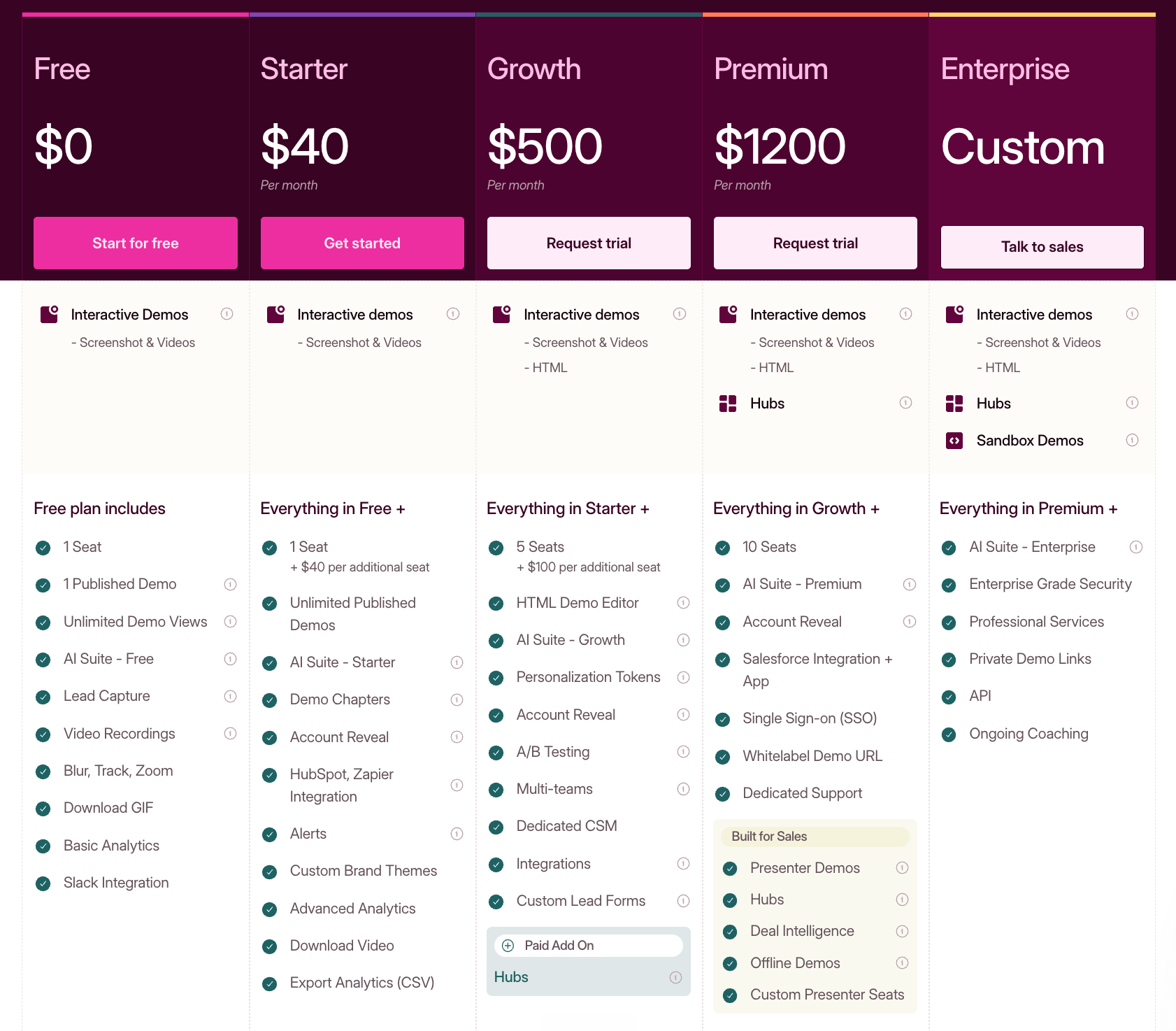
Consensus requires annual contracts starting at $600/month ($7,200 upfront commitment) with no free tier to test the platform. Even at this entry level, you're locked into marketing-only integrations—sales tools require upgrading to the $1,250/month Pro plan.
Storylane offers a free tier and monthly billing options. At the comparable price point, the feature gap is significant:
Storylane at $500/month includes:
20+ native integrations covering both marketing AND sales tools
Dedicated customer success manager
Monthly billing available
Consensus at $600/month includes:
6 marketing-only integrations
No dedicated support
Annual contract required with 90-day cancellation notice
By the way, Storylane also has a $40/month starter tier with unlimited screenshot and video demos and basic integrations like HubSpot, Google Analytics and Slack—perfect if you need quick product tours to embed on your website.
At the premium tier ($1,200/month),
Storylane adds features Consensus doesn't offer at any price point:
Offline demos for events where WiFi is unreliable
Presenter demos with demo notes and script, only you can see during live demos—valuable for delivering confident presentations
Consensus contract inflexibility problem
Consensus's auto-renewal terms require a 90-day advance notice to cancel—otherwise, you're automatically locked into another year. While Consensus users praise their helpful CSM team, this strict policy undermines that customer-first approach.
One reviewer notes:
Another states: "I would like to cancel my service, but apparently, we're locked in for another year."
These terms create significant exit barriers, making it difficult to leave even if the platform no longer fits your needs.
Verdict: Storylane offers more accessible entry ($40 vs $600), better value at comparable tiers ($500 vs $600 for HTML), and more flexible contract terms.
7. Enterprise readiness: managing teams and systems
When multiple teams create demos—sales, marketing, customer success, SEs—you need control over who can do what. But you also need to think about what systems you're actually managing.
RBAC and permissions
Consensus wins on depth: Eight-plus standard roles, custom role creation, and granular permissions. If you're managing complex enterprise org structures with different access needs across departments, this is genuinely comprehensive.
Storylane offers simple RBAC, but not at Consensus's depth. We cover the essential permission controls most teams need, but if you require highly granular, custom role definitions, Consensus wins here.
One note though: Despite all this granular permission management, Consensus doesn't offer bulk team management (we don't either, to be fair 😬). So when you're managing those complex permissions, updating team members one by one becomes a bigger hassle.
Still, if you need RBAC depth, Consensus delivers.
The two-platform problem
Consensus + ReachSuite are two separate systems. Interactive demos live in ReachSuite, video demos in Consensus legacy. Different logins, separate workflows, duplicate permission management.
Storylane is one unified platform. HTML demos, screenshot tours, video demos—everything in the same system.
When you need to update access or onboard users, you're doing it twice with Consensus. Training covers two products. Support tickets go to different systems.
Verdict:
Consensus wins on RBAC depth for complex enterprises.
Storylane wins on operational simplicity with one unified platform.
Choose based on whether permission granularity or system consolidation matters more to your team.
Decision Framework: Which platform fits your team?
Choosing between these two platforms comes down to one question: Do you value enterprise-grade complexity or GTM-wide agility?
Use the guide below to determine which tool aligns with your current team structure and goals.
Consensus vs Storylane feature comparison table
Feature
Consensus
Storylane
Primary strength
Sophisticated video branching & deep enterprise RBAC.
Easiest to use, AI-native
Ideal user
Sales Engineers (SEs) in large enterprise orgs.
The entire GTM team (Marketing, Sales, CS, & SEs).
Setup time
Weeks (Sales-led cycle + steep learning curve).
Minutes. Fastest time to value (Self-serve + intuitive UI)
Maintenance
Winner:Automated "Bot-replay" for UI updates.
Manual (but fast) screen swapping.
Link management
Requires manual updates across touchpoints.
Winner:Persistent links (republish without broken links).
Platform feel
Fragmented (Two separate systems for video/HTML).
Unified (One platform for all demo types).
Some questions to ask yourself when deciding between Storylane vs Consensus
Is my product UI stable? If yes, Consensus’s auto-update is a powerhouse. If no (rapidly evolving), Storylane’s screen-swapping and link stability are safer bets.
Who is building the demos? If it’s just SEs, the Consensus learning curve is manageable. If you want Sales and Marketing to build, Storylane is the clear choice.
Do I want to talk to a salesperson today? If you want to start building right now, Storylane is the only option that offers immediate self-serve access.
Choose Consensus if...
Deep Hierarchy is Mandatory: You require more than 8 distinct user roles and highly granular custom permissions to manage a massive global organization.
Video Branching is Your Core Strategy: Your sales cycle relies heavily on "choose-your-own-adventure" video paths rather than interactive HTML/browser-based tours.
You Have Dedicated SE Resources: You have a team of Sales Engineers who have the time to master a complex tool and manage the "bot-replay" maintenance workflows.
Reporting > Action: You need complex, stakeholder-ready data exports to justify budget at the executive level and don't mind a steeper learning curve to get them.
Choose Storylane if...
Speed is a Competitive Advantage: You want to go from "idea" to "live demo" in minutes, using AI to generate scripts and guides automatically.
You Want a Unified Buyer Experience: You prefer a modern, sleek interface where buyers can skip video segments and navigate intuitively without friction.
You Operate a Lean GTM Team: You need a tool that Marketing and Sales can use effectively without waiting on a Sales Engineer to build every demo.
Omnichannel Distribution is Key: You need to export demos as GIFs or videos for email sequences and social media, and you need live links to update automatically when you hit "republish."
Frequently asked questions - Consensus vs Storylane
Q. What is the best Consensus alternative that's easier to use?
Storylane is widely considered the top alternative to Consensus for teams prioritizing ease of use. Storylane allows users to sign up and build their first demo in minutes. Its AI-native interface automates script writing and guide creation, making it much more intuitive for non-technical users.
Q. How does Storylane compare to Consensus for presales?
While Consensus is a powerhouse for automated video branching and complex enterprise deal-tracking, Storylane is better for presales teams that need to scale quickly. Storylane offers an intuitive and unified platform for HTML, screenshots, and video demos. Perfect for sales reps who need to build and share "leave-behind" demos or personalized tours without SE bottlenecks.
Q. Between Storylane and Consensus, which one is best for scaling demos?
Storylane is built for scale from the ground up. The AI-native creation workflow means anyone on your GTM team can build demos without training—that's how we created 7,000 demos for our SEO experiment. Consensus requires more specialized knowledge and dedicated SE resources, which becomes a bottleneck as demo needs grow across sales, marketing, and CS teams.
Q. Can I try Storylane before committing to a paid plan?
Yes. Storylane offers a free plan where you can sign up and start building immediately—no sales calls required. You get hands-on experience with the platform before deciding if it's right for your team. Consensus requires going through their sales process before you can access the product.
Q. How does pricing compare between Consensus and Storylane?
Both platforms now show pricing on their websites. The key difference is access: Storylane offers self-serve plans you can start using today, while Consensus requires a sales conversation even with transparent pricing. Your actual costs will depend on team size and feature needs—we'd recommend getting quotes from both based on your specific requirements.
Q. Which platform has better integrations?
Both platforms integrate with major CRMs like HubSpot and Salesforce. The integration quality is comparable. Your choice should be based on the other factors we've covered—demo creation speed, user experience, and platform complexity—rather than integration capabilities alone.
Q. What if my product changes frequently?
If your UI changes often, Storylane's link stability is crucial—republish updates to the same link everywhere without breaking embeds. Consensus's auto-update is powerful but breaks when the product structure changes significantly. For rapidly evolving products, Storylane's approach is more reliable.
Q. Do I need a dedicated demo team to use these platforms?
Consensus typically requires a sales engineer or a presales team due to its learning curve and complexity. Storylane is designed for distributed creation—marketing, sales, and CS can all build demos independently. If you want demos managed by specialists, Consensus works. If you want GTM-wide enablement, Storylane fits better.
Your sales engineer just watched a loading spinner kill their momentum mid-demo. Again.
If you're here, you're weighing a tough decision: spend $30,000+ on Saleo's live overlay demos or go for Storylane's interactive HTML demos. The tech is fundamentally different—one overlays demo data on your live product, the other creates standalone HTML replicas.
We'll show you where Saleo works well and why we think Storylane fits most teams better.
Let's be honest about what Saleo does well
Let's start with credit where it's due: Saleo is great for running live product demos.
Saleo overlays allow you to show your product with clean demo data—perfect numbers, the right logos, no messy real data.
Instant switch from overlay to live product. Turn off overlays mid-call and immediately show your real product running. No switching environments, no losing context—that instant switch is what teams pay for.
Quick personalization and reusability. Set up your product once, then overlay different data in minutes. Demo to Dolce & Gabbana, then Ruffle Butts, then Next Retail—each taking minutes instead of hours of teardown and reconfiguration.
AI-powered data modeling. Change one metric and Saleo automatically updates related fields across your entire product. No manual configuration needed.
Authentic product experience. Prospects interact with your actual product interface, not a simulation. Every click, navigation, and workflow is real—only the data displayed changes.
But this specialized focus creates limitations for most teams:
Narrow scope - Saleo specializes in live screen-share demos. While they offer Saleo Capture for async demos, that's a newer feature with not much market presence yet.
Expensive and hard to scale - The overlay tech you would pay $30,000-$100,000+ annually can be overkill for most teams. The complexity and the price make it hard to give access beyond your SE team
Your product's problems become demo problems - You inherit bugs, server lag, and loading times. G2 reviews mention "weekly bugs/glitches" during live calls.
Takes forever to set up - Implementation takes 3+ months with a steep learning curve described as "overwhelming" in G2 reviews.
SEs still do all the work - Only sales engineers can really use it, creating a demo factory problem instead of letting everyone make demos.
Saleo vs Storylane: feature and pricing comparison
Saleo
Storylane
What it is
Live product overlay
Multi-format demos (HTML + Screenshot + videos)
Best for
Late-stage POCs
Early stage live demos (+website embeds and async sharing)
Pricing
$30K-$100K+ annually
$6K annually
Setup time
Weeks to months
Minutes
Who creates
SEs focused
Entire GTM team
Live call stability
Reliability on the live product
Standalone demos Independent from live environment
Product tours
Limited (Saleo Capture)
Native
For teams whose sales motion centers on live, SE-led technical validation with enterprise buyers, Saleo makes sense. For everything else, simpler and more powerful alternatives exist.
Now, let’s break down the key differences between the two platforms.
1. Demo creation & personalization
We’ll explore how these tools enable SEs to create demos at scale.
Speed to first demo
Saleo requires building a demo environment first
You can't use Saleo on your production environment. When you turn off the overlay to show the "live product," you'd expose real customer data. So you need to build a separate demo environment with sanitized data first. Then Saleo overlays on it, and when you switch to "live," you're showing the demo environment (safe), not production.
Building a demo environment takes 20-100+ hours, depending on product complexity. Once that exists, Saleo's reusability kicks in: set up once, swap data quickly for different prospects.
Storylane bypasses demo environments entirely
Creates an interactive HTML replica of your product in minutes:
AI-powered HTML capture: Click through your product's interface, and Storylane auto-captures screens, AI generates context-specific tooltips, voiceovers (in 15+ languages), and videos in seconds
No data exposure risk: The HTML capture is completely separate from your live product. There's no connection to production during demos
Multi-format guided demos and sandboxes: Create guided product tours with step-by-step walkthroughs or full sandbox environments where prospects explore freely
Personalizing demos for different prospects
Once you have demos ready, you need to customize them.
Storylane uses an AI HTML editor for personalization. Use simple prompts to customise demos instantly. Or edit the HTML directly. Use tokens for dynamic data like company names, currencies, and user names.
Saleo excels here through data injection and overlays. It intercepts what displays on screen and replaces it with demo data.
Set up your product once, swap data in minutes.
AI modeling updates related fields automatically
Verdict: Both platforms offer fast personalization through AI. The difference is the initial demo environment setup needed in Saleo. Storylane bypasses that setup entirely—anyone can create and personalize demos in minutes.
2. Demo sharing and distribution
You've built a demo. Now you need to get it into prospects' hands—whether that's sharing after a call, embedding on your website, or sending in follow-up emails.
Async demos and sharing capabilities
Modern B2B buying involves 6-10 decision makers. Most never attend your live demo call. They need async access to evaluate your product and share it internally with their buying committee.
Saleo's async sharing capabilities are new, with limited market presence
Saleo's core strength has always been their live demos via (Saleo Live). To catch up to the innovations in the demo automation space, they launched Saleo Capture in 2024. On paper, Saleo Capture helps you create product tours and website embeds and create shareable demos. However, this isn't their core offering and has very limited market presence of real customers actually using it.
Storylane is built async-first with proven distribution at scale
Storylane was designed for async demos from day one. Create once, deploy everywhere:
Prospects explore demos independently without you
Champions forward to buying committees (finance, legal, IT)
Export demos as videos and GIFs for email campaigns, social platforms, and offline presentations
This matters when your internal champion needs to present your product to stakeholders who weren't on the original call.
3. Buyer experience
You've sent the demo to prospects. But how does it actually perform when they interact with it?
Demo reliability and performance
Your product's performance directly impacts your demo's success. A loading spinner or bug during a Fortune 500 call can kill momentum and credibility.
Saleo inherits your product's performance issues
Because Saleo Live overlays data on your live product, whatever happens to your product happens to your demo:
Your product loads slowly? Your demo loads slowly
Server latency during peak hours? You ride it out
A bug surfaces mid-call? You see it during the demo
G2 users report this friction:
"Slows tech down...if I pre-load a lot of windows for a demo it can cause the system to slow down or even crash." (Katherine A., Solutions Engineer, Enterprise)
Some product features legitimately take time to load—complex dashboards process data, reports generate calculations, integrations pull from external systems. That wait makes sense in the actual product. But during a demo call, that same delay kills momentum.
Storylane runs independently without product dependencies
Storylane demos are standalone HTML files. They don't connect to your backend, query databases, or make API calls.
Your product hits a bug during a call? Server latency spikes? Doesn't matter—Storylane isn't connected to your infrastructure. Every prospect sees the same fast, stable experience regardless of what's happening with your product.
AI sales agent for buyer enablement
Storylane's Lily AI handles product conversations 24/7
Lily AI is a conversational sales agent that handles product conversations like your best sales rep. She manages inbound prospects by answering product questions and addressing objections.
Enables buyers to independently evaluate your product by surfacing relevant demos and other assets
Qualifies leads based on fit and engagement
Lily is trained on your playbooks, scripts, and documentation—working 24/7 without waiting for your team.
Saleo doesn't offer an AI sales agent
Saleo doesn't have an equivalent AI agent feature for buyer enablement.
Verdict: Storylane wins on reliability and buyer enablement. Standalone architecture means demos work consistently regardless of product performance. Lily AI extends buyer support beyond your team's availability.
4. Analytics
Both tools provide a view of how your demos are performing. Track completions, time in tour, drop-offs, and captured leads. Straightforward interface focused on actionable metrics.
However, Storylane has an edge over Saleo's standard analytics with deanonymization capabilities. Account Reveal gives you account-level insights on who is engaging with your demo. This info is really useful to prioritize outreach to high-intent accounts and follow up with prospects at the right time based on their actual engagement.
5. Cross-team adoption
Your demo needs to extend beyond your SE team. Can everyone create demos, or does it stay locked with technical resources?
Who can actually create demos
Saleo requires technical expertise and SE involvement
Saleo's learning curve is steep. G2 reviews consistently mention:
"Learning curve can be overwhelming" with "trial and error" configuration
Setup requires SE technical knowledge
As SAP’s Demo Project lead, Jane Zhou states on G2:
This keeps demo creation centralized with sales engineers. AEs and CSMs can't build demos independently—they need SE support. For teams with limited technical resources or those needing rapid deployment, this creates a bottleneck.
The business impact: Your 6 SEs become the bottleneck for 45 AEs, 45 CSMs, and your entire BDR team.
Storylane enables cross-team demo creation without bottlenecks
Storylane has the highest ease of use rating in demo automation (9.5/10 on G2). Anyone on your GTM team can create demos. It enables cross-team demo creation without bottlenecks
AEs build personalized demos for their prospects
BDRs embed demos in outreach sequences
Marketing adds demos to landing pages
CSMs create demos for upsell conversations
Setup takes minutes. No technical training required. No ongoing SE support needed.
Time to value
Saleo takes weeks to months for implementation
Initial setup requires 2-3 months for full implementation with continuous technical resources from both your team and Saleo's. Building demo environments alone takes 20-100+ hours, depending on product complexity.
You need budget approval, technical setup, SE training, and ongoing maintenance before your first demo goes live.
Storylane gets you productive in minutes
Sign up and start building immediately. Your first demo can be live in minutes with no sales calls required to access the product. The intuitive interface means teams create without training sessions—self-serve from day one.
Verdict: Storylane wins on scalability and speed to value.
Storylane features that go beyond Saleo's scope
Buyer Hubs Bundle multiple product tours, PDFs, videos, and resources into a single shareable link. Different personas get different content—all from one URL.
AI voiceovers: Choose from dozens of voices in 25+ languages to create professional narration without recording. Saves hours on manual recording, speaks to your audience's language, and is perfect for global teams creating localized demos.
Offline Demos: Download and run demos without WiFi at conferences, trade shows, and site visits. No more worrying about spotty conference WiFi or connectivity issues during high-stakes presentations. Your demos work flawlessly whether you're online or offline.
Presenter Demos: Run polished live demos with hidden guides and presenter notes visible only to you in a separate tab. Prospects see a clean demo experience while you have talking points, product specs, and scripts at your fingertips. Helps newer reps deliver demos with the confidence of your top performers.
6. Pricing and flexibility
Demo tools are a significant investment. Understanding the actual costs and what you get at each tier matters.
Pricing structure and access
Saleo requires annual contracts with enterprise pricing
Saleo doesn't publish pricing publicly. Based on market research and past users, pricing ranges from $30,000 to $100,000+ annually, depending on the number of users, demo instances needed, and product complexity.
Key pricing considerations:
Per-instance pricing model: Each new demo variant or product line is a separate line item
No free tier or trial to test before committing
Requires sales conversations to get pricing and nnual contract commitment
The cost structure makes horizontal adoption difficult. At $30K-$100K, you can't easily enable your entire GTM team—demos stay centralized with your SE organization.
Storylane offers flexible pricing with self-serve access
Storylane shows pricing publicly and offers multiple entry points. The free tier includes 1 demo with AI creation and unlimited views—test the platform before committing. The $40/month starter tier provides unlimited screenshot and video demos with basic integrations, perfect for product tours on your website.
At $500/month, the HTML plan includes
Full interactive HTML demos with advanced personalization features
20+ native integrations for marketing and sales,
Dedicated customer success manager.
At comparable pricing to Saleo's entry tier, Storylane includes features that enable your entire team—not just SEs.
Implementation costs beyond subscription
Saleo requires significant technical investment
Beyond the annual subscription, you're looking at 2-3 months initial setup time and 20-100+ hours building demo environments. You'll need ongoing technical resources for maintenance, and API integration costs are customer-funded separately.
You're paying for the subscription and the internal resources to implement and maintain it.
Storylane requires minimal setup investment
Get to your first demo in minutes. No technical implementation required, no ongoing maintenance resources needed. Start creating immediately after signing up.
Verdict: Storylane offers more accessible entry ($40/month vs $30K+ annually) and flexible contract terms.
7. Decision framework: Which platform fits your team?
Choose Saleo if:
Your sales motion focuses on live product demos for late-stage deals where buyers need to see your actual product running with real interactivity. You have $30,000-$100,000+ annually, dedicated SEs to manage demos, and your sales motion is live-call driven with decision makers attending demos.
Choose Storylane if.
Your demos need to work beyond live calls—buyers sharing internally, website embeds, email campaigns, and post-call follow-ups. You want cross-team creation where AEs, BDRs, and Marketing build demos without SE bottlenecks. Performance matters and you need demos that won't inherit your product's bugs or loading times.
Budget: $500/month vs $30,000+ annually for unlimited demos across your entire GTM team.
Frequently asked questions - Saleo vs Storylane
Q. Can I use both Saleo and Storylane together?
Yes, you can use both Saleo and Storylane together. Most teams use Storylane for the majority of their demos (website embeds, email outreach, leave-behinds, early-stage calls) and reserve Saleo for the 10% that require live product validation during enterprise POCs.
Q. Which tool is better for early-stage demos?
Storylane is better for early-stage demos. Early-stage prospects need fast, shareable experiences they can explore async and forward to their team. Saleo only works during live screen shares. By the time you're doing live demos, most buying committee members have already formed opinions based on what they saw (or didn't see) earlier.
Q. What if my product updates frequently—which tool requires less maintenance?
Storylane requires recapturing affected screens when UI changes (5-10 minutes). Saleo requires managing overlays after product updates and debugging when changes break your demo environment. Recapturing a screen is instant without the complexity of replacing overlays on a live product.
Q. What are the best Saleo alternatives for sales engineers?
TestBox and Storylane are the best Saleo alternatives for sales engineers. For live product demos: TestBox creates actual demo instances with better stability than Saleo's overlay approach. For everything else: Storylane creates HTML replicas that work for website embeds, email campaigns, leave-behinds, and early-stage calls without Saleo's cost, technical complexity, or reliability issues.
Q. How does Storylane compare to Saleo for demo personalization?
Both Storylane and Saleo personalize demos, but the approaches differ fundamentally. Saleo overlays custom data on your live product during screen shares. Storylane uses tokens to dynamically insert prospect data into HTML demos. Both achieve personalization—Storylane does it without product dependencies
Q. How long does it take to build a demo in Saleo vs Storylane?
Saleo setup: Weeks to months for initial implementation. Minutes to overlay data once configured.
Storylane setup: Within minutes. Click through your product once, edit what you need, deploy everywhere.
Q. Which demo tool helps reduce sales engineer time on demos?
Storylane reduces sales engineer time on demos more effectively. AEs, BDRs, and CSMs create their own Storylane demos in minutes without SE involvement. SEs focus on deals requiring deep technical validation instead of being demo factories for every early-stage call.
Q. What's the best demo software for complex technical products?
The best demo software depends on the use case:
Need live product validation with real calculations? Saleo or TestBox.
Need reliable demos that don't inherit your product's performance issues? Storylane.
Most complex products need both: Storylane for everything except final technical validation.
You understand how letting prospects experience your product before they sign up creates high-intent leads who convert faster. You know how optimizing for PQLs helps you improve lead-to-conversion rates compared to MQLs. And you just learned how interactive demos influence PQL without dependency on your product team.
But this is where most teams get stuck, i.e., between understanding the concept, and actually shipping their first interactive demo.
This guide picks up where the theory ends—with the exact steps to go from idea to live implementation.
Your first interactive demo should showcase the one feature or use case that makes your best customers say, "This changes everything.", ideally a core workflow that solves your prospects' biggest pain point.
What’s that one thing you demo that makes prospects lean forward? That moment when a prospect's expression changes from skeptical to interested—that's usually your winner.
Look at your highest-converting trials or your shortest sales cycles. What did those prospects do first in your product? That's your workflow you include in your first demo. But how do you identify which pain point to focus on?
Mapping pain points to demos
Start with the problem that brings prospects to your website in the first place.
Your sales team is sitting on gold here; ask them how prospects discovered you. They likely already have this info, but it doesn't hurt to check the demo/discovery call transcripts and look for clues.
You can even ask your sales team to include the question in the demo/ discovery call to uncover what your prospects were looking for when they found you.
If they're coming because "reporting takes too long," your first demo should show them building a report in minutes. Yes, you have cool “data integration” features, and they can come into play too, but start with the core pain point first.
For example, if prospects struggle with manual data entry, don't make your first demo about your advanced analytics. Show them the interactive demo of your tool, eliminating the data entry entirely. Lead with the workflow that makes your product the direct solution to their stated problem. (Bonus points if you use realistic data that matches their industry and company size. Psst: Storylane’s HTML capture lets you manipulate data you showcase in just a few clicks!)
The sweet spot is a workflow that can demonstrate clear value within 3-5 minutes. You want prospects to reach an "aha moment," not get lost in configuration steps.
Here's an example of an interactive demo in action:
Building that first demo
Your interactive demo needs a narrative arc. The most effective demos follow a simple three-act structure:
Problem → Solution → Outcome.
Begin by acknowledging their pain point directly—if reporting takes hours, start with a screen showing cluttered spreadsheets or manual processes. Then demonstrate the workflow that eliminates that pain. End by showing the result they care about: the report generated in minutes instead of hours.
Keep the clicking purposeful. Each interaction should move them closer to that "aha moment." Guide them through a logical sequence that builds confidence. Show the recipe, not the kitchen.
Pro tip: Create scenarios around outcomes they're trying to achieve, not features you want to showcase. Instead of "Here's our dashboard," try "Here's how you'd track this month's pipeline velocity." The language shift makes all the difference.
Additional ideas to explore:
Use data that mirrors their world. If you're targeting mid-market SaaS companies, show realistic monthly recurring revenue numbers, churn rates, and customer acquisition costs they'd recognize. For enterprise manufacturing prospects, use supply chain metrics and production volumes that make sense for their scale. (Storylane's HTML demos let you customize and insert data on the fly for different audience segments)
Example demo with relevant industry data
Where to place your first demo
Start with your highest-intent pages—the places where prospects are already showing buying signals. Your homepage could be an obvious one, but you might get better mileage on product landing pages.
Product pages convert better than homepages for interactive demos. Someone reading about your "reporting features" is closer to purchasing than someone just learning about your company. Place your demo where prospects are already trying to understand how your product works.
Landing pages from paid campaigns are goldmines. These prospects clicked an ad about solving a specific problem—now show them the solution in action. Replace or complement your lead capture forms with interactive demos. Show them how your product works within the context of the ad query.
A simple placement rationale:
Product/feature pages - They're already interested in capabilities
Campaign landing pages - High-intent traffic from ads or outreach
Pricing pages - They're evaluating, show them value before cost
Homepage - Broader audience, but still valuable for brand awareness
Don't bury your demo behind multiple clicks. Make it prominent with clear value-focused copy: "See how [specific outcome] works". The goal is to meet prospects where they are in their evaluation process.
Okay, but what metrics should I track?
Interactive demos give you a granular understanding of your prospect’s interest level with respect to your product capabilities. Demo views would be an important metric to track.
Demo completion rates and engagement rates allow you to dig deep and gain far richer insights about your prospect behavior.
If your demo has three key workflows, measure how many prospects complete each one.
Someone who rushes through in 30 seconds isn't the same as someone who spends 4 minutes actively clicking through different chapters of the demo.
Engagement depth matters. A prospect who spends 2 minutes exploring your reporting workflow and returns to it twice shows higher intent than someone who passively clicks through everything once.
Look for patterns: which sections create the most engagement? Where do high-intent prospects spend their time? And most importantly, look for areas where engagement dips—these are dead spots you need to polish or, possibly, remove.
Demo engagement correlation with trial signup quality
The real magic happens when you connect demo behavior to trial performance. Prospects who complete specific demo workflows are more likely to hit trial activation milestones.
Track which demo interactions predict successful trials. If prospects who explore your integrations section in the demo are more likely to actually set up integrations during trials, that's your qualification signal. These patterns help you identify pre-PQLs based on demo engagement.
Bonus tip: If you want to dig deeper, you can create multiple cohorts: demo completers vs. non-completers, deep engagers vs. surface-level clicks. Then measure their trial activation rates, feature adoption, and conversion to paid.
Leading indicators that predict which demo viewers will become customers
Certain demo behaviors consistently predict purchase decisions. Someone who shares the demo with team members is signaling buying committee involvement.
Look for workflow-specific engagement patterns. If your best customers always use feature X, prospects who spend significant time in that demo section are higher-intent leads. Time spent in pricing-related screens or integration demos often correlates with near-term purchase decisions.
The main idea is to connect demo engagement back to your existing conversion data. Which demo behaviors mirror the early signals your best customers showed during their evaluation process?
Real examples to steal from
What you can steal from Cognism
Cognism puts their interactive demo front and center on their homepage. No forms, no friction—just immediate product showcase.
The steal: They lead with their strongest use case (prospecting workflow) rather than trying to showcase everything. Their demo follows a realistic sales scenario: finding contacts at a target company, enriching data, and exporting qualified leads. The entire flow takes 2-3 minutes and shows a tangible outcome—a list of prospects ready for outreach.
Tactical takeaway: Don't gate your primary demo behind forms. Make it the easiest thing to access on your most trafficked pages. Focus on one complete workflow that delivers a clear result prospects can envision using immediately. Make sure to use a sticky CTA within the tour to capture leads.
What you can steal from Sprout Social
Sprout Social's guided tour walks through their social media dashboard using real brand data and realistic posting scenarios. They don't show generic social posts—they simulate managing an actual brand's content calendar with scheduled posts, engagement metrics, and team collaboration.
The steal: They contextualize each feature within a broader workflow. Every click advances a realistic social media management scenario.
Tactical takeaway: Connect individual features to complete business processes. Show prospects how your tools fit together to solve their daily workflows, not just what each feature does in isolation.
What you can steal from SentinelOne
SentinelOne created an entire demo hub with scenario-based experiences for different security threats. Prospects can choose their specific concern (ransomware, endpoint protection, threat hunting) and see how the platform responds to that exact scenario.
The steal: They personalized the demo experience based on prospect interests. A CISO worried about ransomware sees different workflows than a security analyst focused on threat detection. Each demo addresses specific pain points with relevant scenarios.
Tactical takeaway: Create multiple demo paths for different use cases or personas. Let prospects self-select into the scenario most relevant to their situation rather than forcing everyone through the same generic experience.
Scaling beyond your first demo
Once your first demo proves its value, it’s time to scale.
If prospects spend the most time in your reporting workflow, consider creating a dedicated reporting-focused demo for campaigns targeting that specific pain point. Build depth before breadth.
Create demo variations for different audience segments rather than completely new demos. Your core workflow stays the same, but the data, industry context, and use case scenarios change. A marketing team sees campaign performance metrics while a sales team sees pipeline data—same product capabilities, different relevance contexts.
Connecting demo insights back to the overall PQL strategy
Demo engagement data becomes your early warning system for PQL potential. Prospects who complete specific demo workflows mirror the behavior patterns of your best trial users.
Use demo analytics to refine your traditional PQL criteria. If prospects who explore integrations in your demo consistently become high-value customers, make integration setup a stronger signal in your PQL scoring. Demo behavior often predicts trial behavior more accurately than demographic data.
Create feedback loops between demo performance and product development. If prospects consistently drop off at the same demo section, that workflow might need simplification in your actual product.
The ultimate goal is creating a system where demo engagement serves as a leading indicator for PQL conversion, giving your team earlier and more accurate qualification signals than waiting for trial milestones
How Storylane makes this implementation seamless
Storylane (hey, that’s us!) eliminates the technical barriers keeping you from implementing interactive demos that drive better PQLs— allowing users to deploy PQL-driving demos without engineering dependencies.
How do we do this?
AI-native interactive demos: Generate interactive demos with AI in seconds that prospects can explore independently.
Browser extension captures your actual product interface in minutes andautomatically generates product tours that mirror your actual interface
Smart customisation: Edit text, images, and present industry-relevant data in your demos—no coding needed.
Analytics integration: Track engagement depth, workflow completion, and sync demo behavior back to your CRM for seamless lead qualification.
Lead capture forms: capture leads within the demo with lead forms and convert visitors to high-intent leads
Common objections you might get (and how to address them)
You will likely get objections from stakeholders. And that’s a good thing, as it gives you the opportunity to address them and get stronger buy-in once you address them. Here are the common objections:
“Our product is too complex for demos."
Complex products often benefit most from guided tours that break down complex workflows into easy-to-understand chunks. Just pick one workflow that delivers clear value. Your prospects don't need to see everything - they need to understand one thing really well.
"We're worried about showing our product before qualifying them."
Product education IS qualification. Besides, you're already showing your product in sales demos to unqualified prospects. This just moves product education earlier, where it can actually do the qualification work. Prospects who invest time learning your product demonstrate significantly higher purchase intent than those who simply download content.
"Our sales team won't like this."
Sales teams love leads who already understand the product. Their conversations become about implementation instead of basic education.
"We don't have resources to build interactive demos."
Interactive demo platforms like Storylane remove technical barriers, allowing marketing teams to create interactive product demos in minutes without requiring engineering resources. You can easily capture your product’s front end without any technical know-how. The demo platform automatically makes the perfect HTML replica of your product. Your job is just to tell the story.
Q. What is a Product Qualified Lead (PQL) and how do interactive demos generate them?
A Product Qualified Lead is someone who's experienced your product's value through hands-on interaction—making them 5-8x more likely to convert than MQLs. Interactive demos create PQLs by letting prospects explore core workflows before signing up, so they self-qualify based on actual product fit.
Q. What's the difference between product qualified leads and marketing qualified leads?
MQLs signal interest through content downloads or webinar attendance, converting at ~6%. PQLs experience your product through demos or trials, converting at 5-8x higher rates because they self-qualify based on actual product fit rather than sales persuasion.
Q. How long does it take to create your first interactive demo?
Your first interactive demo takes 2-3 hours to build with no-code platforms like Storylane—most teams ship within a day. You capture your product interface with a browser extension in minutes, then customize the flow without engineering help.
Q. How do sales teams use interactive demos to generate PQLs?
Sales teams use demos to qualify prospects before calls, not replace conversations—reps get leads who already understand the product and are ready for implementation talks. Demos provide analytics on exactly which features prospects explored, so reps personalize calls around actual interest instead of guessing.
Q. Do I need engineering resources to build interactive demos?
No—platforms like Storylane use browser extensions to capture your product's HTML automatically. It allows marketing teams build demos without touching code. Teams launch their first demo in under a day with zero engineering dependency.
Q. How do I choose which workflow to showcase in my first demo?
Start with the workflow that makes your best customers say "this changes everything"—usually the feature solving your biggest stated pain point. Look at your shortest sales cycles to identify which 3-5 minute interaction creates the "aha moment," then build around that.
Q. How do interactive demo analytics compare to traditional lead scoring, and which metrics actually matter?
Demo completion rates predict trial activation better than MQL scoring. Prioritize engagement depth (4+ minutes in specific workflows converts 3x higher), workflow-specific behavior patterns, and return visits. Storylane syncs demo behavior to Salesforce/HubSpot for automated lead scoring.
Ready to implement your first interactive demo? Start your free trial with Storylane and build killer demos in minutes! Capture, customize, and deploy interactive demos across your website—no coding or engineering dependencies.
Make buying easy with Storylane
Chat with our demo expert to find out how 2500+ companies use Storylane to drive more revenue